Payment checkout
With online payment, the carpenter pays for a service in a checkout in the service center's system, and the service only becomes approved when your system confirms the payment to Cortecloud.
Your system takes part at three points:
- it receives notice from Cortecloud that the carpenter chose to pay online;
- it creates the checkout and registers its URL on Cortecloud, which redirects the carpenter to it;
- it tells Cortecloud whether the payment was confirmed or canceled.
Registering the checkout endpoint
To receive the notice at the first point, your system needs an endpoint registered on Cortecloud for the service center. Registration is done by support: send the endpoint URL and the service center code to suporte@serrabits.com.br. Without this registration, the online payment option does not appear to the carpenter.
Flow
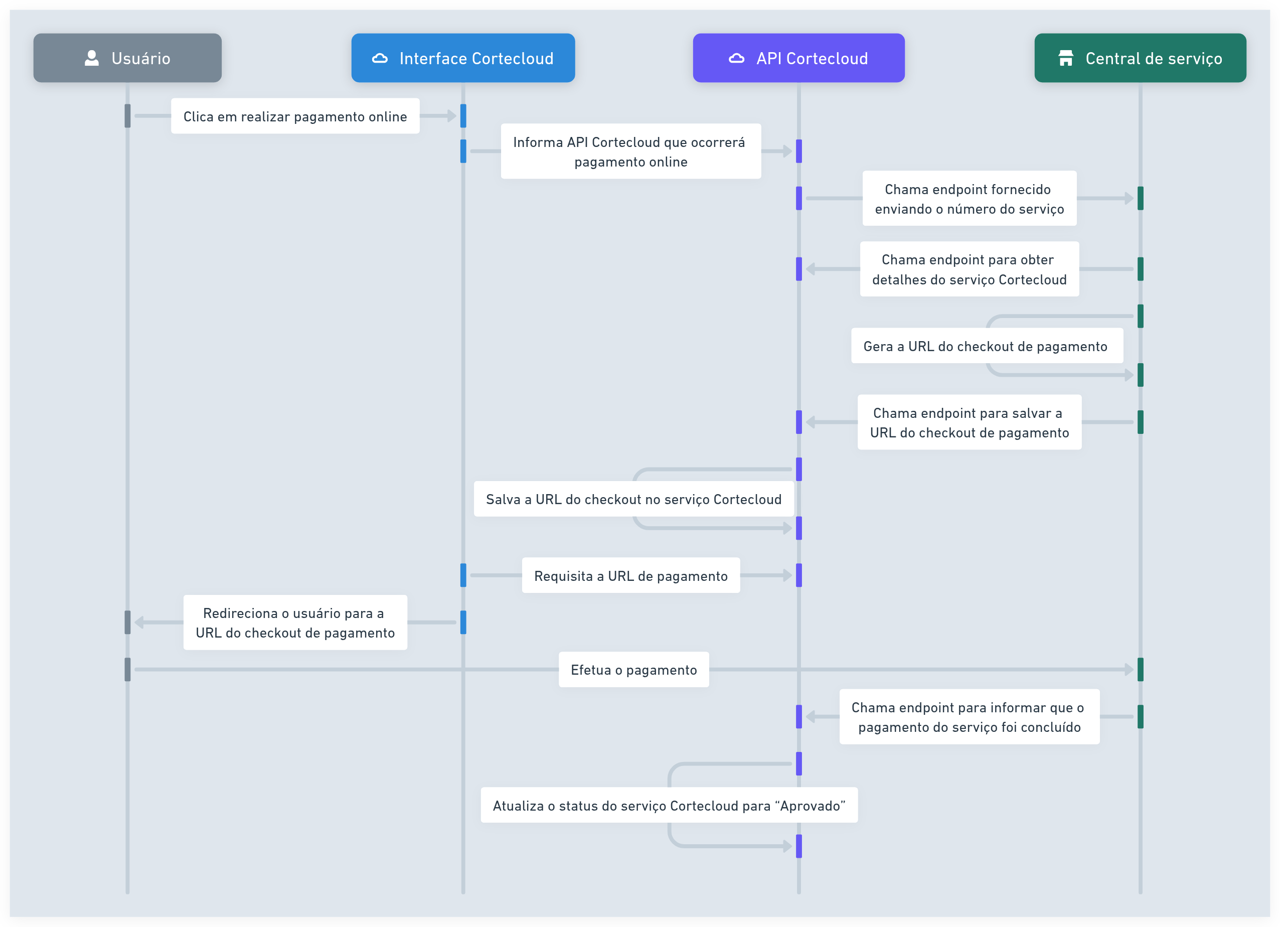
-
The carpenter chooses to pay online for a service in quote generated (
4; see service status). -
Cortecloud notifies your system. The service moves to awaiting online payment (
25) and Cortecloud sends aPOSTto the registered endpoint with the service id:{ "serviceId": 123 }If your endpoint responds with an error, the service goes back to quote generated (
4) and the carpenter is not redirected. This notice carries no credentials: anyone who knows the endpoint URL can call it. That is why step 3 checks the service through the API before creating the charge. -
Your system queries the service with
GET /services/{id}. Check thatstatus.codeis25and use the service's amounts (materials, labor and shipping) to build the charge. -
Your system registers the checkout URL with
POST /payment/checkout-url:{ "serviceId": 123, "url": "https://checkout.example.com/pedido/abc" }Cortecloud redirects the carpenter to that URL.
-
The carpenter pays in the checkout.
-
Your system reports the result:
-
payment confirmed:
POST /payment/finish-checkoutwith thepaymentId, the payment's identifier in your system. The service moves to approved (6).{ "serviceId": 123, "paymentId": "pay_789" } -
payment failed or was abandoned:
POST /payment/cancel-checkout. The service goes back to quote generated (4) and the registered checkout URL is cleared; the carpenter can try again.{ "serviceId": 123 }
-
Until your system reports the result, the service stays in awaiting online payment (25).
Refund
If an already confirmed payment needs to be reversed, call POST /payment/return-service with the same paymentId sent in the confirmation. The service goes back from approved (6) to quote generated (4), and the registered payment and checkout URL are cleared. Keep the paymentId of every confirmation so you can do this.
{ "serviceId": 123, "paymentId": "pay_789" }
The route only updates the service on Cortecloud. Returning the money to the carpenter is done in your payment system.
Required status
Each payment route only accepts the service in one status and responds with 409 otherwise:
| Route | Required status |
|---|---|
POST /payment/checkout-url | Awaiting online payment (25) |
POST /payment/finish-checkout | Awaiting online payment (25) |
POST /payment/cancel-checkout | Awaiting online payment (25) |
POST /payment/return-service | Approved (6), with the same paymentId as the confirmation |